
We provide information regarding the presentations here.
Oral Presentations
- All presentations must use the PCs provided at the venue. Presentations using personal laptops are not permitted.
- The operating system of the presentation PC runs Windows 11, and presentations can be made from PowerPoint files or PDFs.
- Videos can be played if they are in MP4 format. Other formats are not guaranteed.
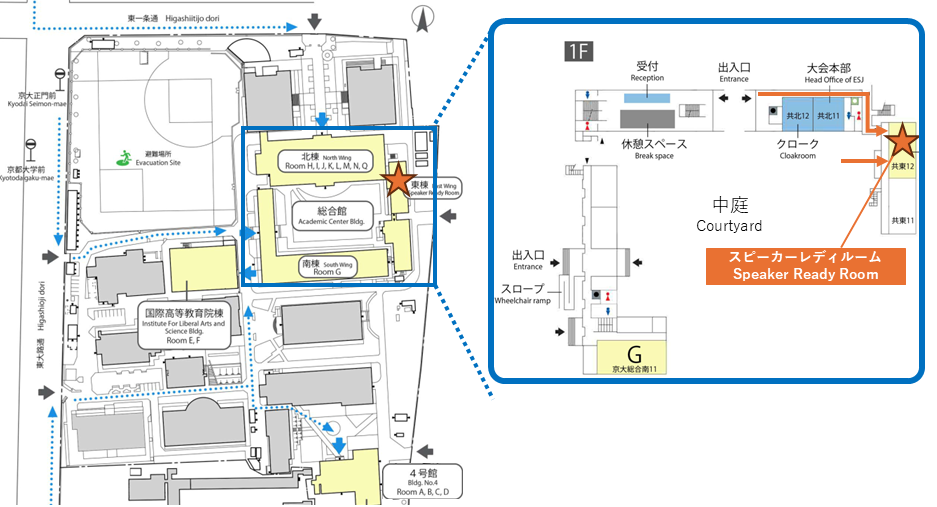
- Presenters must register their PowerPoint or PDF files or other presentation data on the presentation PC in advance in the speaker ready room (East wing of the Academic Center Bldg at Kyoto Univ., 共東12).
- Please prepare a USB flash drive or CD-R containing the presentation file and come to the speaker ready room.
- Oral presenters must submit their presentation files during the designated submission times for each presentation day.
- Presentations on 11th Mar.: 12:00–14:00 on 11th
- Presentations on 12th Mar.: 10:00–12:00 on 12th
- Presentations on 13th Mar.: 10:00–12:00 on 13th
- Presenters in the research field “Wildlife Trade”, “Extended Phenotype”, and “Human Dimensions” must submit their presentation files between 10:00 and 12:00 on 12th Mar.
- After submitting the presentation file, it may be replaced as long as it is within the submission period.
- The total presentation time is 15 minutes: 12 minutes for the presentation and 3 minutes for the Q&A session. Please be punctual: 1, 2, and 3 bells will be rung at 10, 12, and 14 minutes and 30 seconds; for video performances, three bells will be rung at 2 minutes and 30 seconds after the start of the Q&A session.
- The venue’s screen and projector support a 4:3 aspect ratio. If the presentation is created in 16:9 widescreen, text may become small, or some content may not be displayed.
- For oral presentations, the previous speaker will be asked to chair the next presentation, including English sessions. The first chairperson will be assigned by the room attendant.
- If you wish, you can use the Self On-Demand Streaming to record your presentation in advance and stream it on the conference platform.
- Please also refer to the Guidelines on the Use of Generative AI.
Gift for Presenters in English Oral Sessions
- Gifts for English presenters will be distributed. After your presentation, please receive a voucher at the presentation venue and come to the reception desk as soon as possible to exchange it for your gift. Please note that gift exchange is available only during the conference period, and requests after the conference has ended cannot be accommodated.
Self On-Demand Streaming
At this conference, all oral presenters can utilize “Self On-Demand Streaming,” where they record their own presentations and stream them on the online conference platform.
- This applies to all oral presentations.
- The option to upload “explanatory videos”, previously available for poster presentations, has been extended to oral presentations as well.
- The use of Self On-Demand Streaming is optional. It is not mandatory for presentations.
- We do not permit online-only presentations. If you cancel your on-site presentation, you will also be unable to use Self On-Demand Streaming.
- You may only upload one video containing content equivalent to the presentation given on the day.
- Format is MP4 only, with a maximum size of 500MB.
- Please keep your presentation within the allotted time (oral presentation: 15 minutes) and do not exceed it significantly.
- Recording presentations at the conference venue is strictly prohibited in any form. Please record individually either before or after the conference.
- Uploading and streaming will be conducted on the online conference platform “RakuRaku-Conference”.
- Uploads can be made at any time after 30th Jan. 2026 on the RakuRaku-Conference. There is no deadline for uploads, and replacements can be made at any time.
- Only conference participants can view the streaming. It will be published with settings that prevent downloading.
- To make it clear at a glance whether streaming video is available, a marker will be added to the title when a video is uploaded on the online conference platform.
- Presenters shall bear full responsibility for any consequences arising from the content of their videos.
- Online video streaming constitutes public transmission under copyright law. Please take care to avoid copyright violations and defamation issues.
- When citing published works, always clearly indicate the source. If your presentation includes works owned by others, you must obtain permission from the copyright holder for streaming.
Poster Presentation
- Two opportunities for poster presentations are provided: an online poster session and an onsite (in-person) poster session.
All presenters must participate in the online poster presentation.
The onsite poster session is available only to those who selected the onsite option at the time of abstract submission. - For information regarding Junior Posters, please refer to the Junior Poster page.
Poster Preparation
- The poster for the online session must consist of one A0-size poster (portrait or landscape orientation).
- Please prepare the poster in PDF format.
- Do not embed audio or video files within the PDF.
- The maximum file size is 5 MB.
- To ensure smooth display on the platform, a file size of 1 MB or less is recommended.
- The posters for the onsite sessions must fit within the display boards, which are sized to accommodate an A0 portrait poster (approximately 210 cm (H) × 90 cm (W)).
- Presenters may use the allotted board space freely.
- You may use a format different from your online poster (e.g., multiple A4 sheets).
- We encourage presenters to be considerate of attendees who may not understand Japanese.
- Suggestions include providing both Japanese and English summaries or preparing both English and Japanese version of the poster.
- If you prepare both Japanese and English version:
- For the online presentation, you may upload two pages in a single PDF (e.g., A0 Japanese + A0 English).
- The file size limit remains 5 MB for the entire PDF.
- Presenters who selected English as their presentation language must prepare their poster in English.
- Presenters may optionally upload the following materials:
- Graphical Abstract (JPEG)
- This will be used as a thumbnail on the online conference platform.
- Please provide a 1200 × 1200 pixel JPEG image that visually represents your research.
Illustrations, diagrams, or photographs of study organisms are acceptable.
The key purpose is to create an engaging, eye-catching visual that invites attendees to view your poster.
- Supplementary Materials (PDF)
- Additional figures, data, or documents may be included as supplementary materials.
- Include them as additional pages within the same PDF after the main poster.
- The total file size (poster + supplementary materials) must not exceed 5 MB.
- Explanation Videos (MP4)
- Up to two video files may be uploaded.
- Each video must be:
- 5 minutes or shorter
- MP4 format
- Maximum file size 500 MB
- These videos will be displayed separately from the poster on the platform.
- Graphical Abstract (JPEG)
- Please also refer to the Guidelines on the Use of Generative AI.
Online Poster Presentation
- The online poster viewing period is scheduled for 8th–15th Mar.
- All poster presenters must upload their posters by 7th Mar. at 23:59.
- Poster upload will be available at any time on the online conference platform “Rakuraku Conference” starting 30th Jan. 2026.
- Poster files may be replaced or updated at any time.
- There will be no core time or designated discussion session for the online poster presentation.
- Please communicate with participants using the comment function provided on the platform.
- If you wish to give a live explanation online, please arrange your own online meeting system, such as Zoom.
- Access to posters and explanatory videos will be limited to registered participants only.
- Posters will be displayed in a format that prevents viewers from downloading the file or copying text.
Onsite Poster Presentation
- The poster venue will open at:
- 11:00 on March 14
- 9:00 on March 15
- Onsite presenters must mount their posters as follows:
- Presenters on March 14: Please put up your poster between 11:00 and 12:00.
- Presenters on March 15: Please put up your poster between 9:00 and 10:00.
- Poster boards will display a number tag showing the poster number (e.g., P1-001, P2-001).
- Please locate the board with your corresponding number tag and mount your poster there.
- Please bring your own thumbtacks for mounting your poster.
- Thumbtacks tend to be in short supply at nearby shops during the conference, so please prepare them in advance.
- For onsite presentations, a core time will be scheduled on Day 4 or Day 5 of the conference (March 14, 15) from 12:00 to 14:00.
- Presentations with odd-numbered poster IDs will have core time during the first hour (12:00–13:00).
- Presentations with even-numbered poster IDs will have core time during the second hour (13:00–14:00).
- During core time, presenters should stand by their posters and give explanations to attendees.
- Poster removal times:
- Presenters on March 14 must remove their posters by 19:30 on the same day.
- Presenters on March 15 must remove their posters by 17:00 on the same day.
- The poster that receives the Best Poster Award will be displayed in a designated area from 19:30 on March 14 until 14:00 on March 15.
Symposia, Workshops, Forums
- For symposia, workshops, and forums, presentation PCs will not be prepared at the venue. Presenters or organizers are required to bring their own PCs for presentations.
- No file submission is required at the Speaker Ready Room. Please confirm with the organizer if you need to bring your own laptop.
- HDMI is used for connecting to the projector. If you do not have an HDMI conversion adapter, please prepare one in advance.
- The conference organizing committee will not provide a Wi-Fi environment specifically for sessions. Session organizers are required to prepare their own Wi-Fi if needed.
- For details about the venue’s Wi-Fi environment, please refer to this page.
- At most venues, the tables and chairs in the audience seating area are fixed to the floor. Please be aware of this when planning discussions etc. Additionally, microphones will be set up in each venue, with a minimum of two.
- If the organizer requests it, the presentation will be recorded by a contractor.
- To prevent troubles for recording, all recording tasks will be handled by the contractor. Organizers cannot perform the recording. The Self On-Demand Streaming prepared for oral presentations is not available.
- Recording will be conducted using cameras provided by the contractor installed at the venue, so the venue layout and speakers’ faces will be visible during recording.
- For Q&A and discussions, only content spoken through the microphone can be recorded.
- Please also refer to the Guidelines on the Use of Generative AI.
Guidelines on the Use of Generative AI
- If generative AI tools (e.g., large language models such as ChatGPT) are used in the preparation of posters, presentations or in data analysis, presenters must clearly state the scope of their use (e.g., illustration generation, assistance with data processing).
- Minor uses that do not substantially affect the content of the poster — such as stylistic refinement, proofreading, or checking for typographical errors — do not require disclosure.If generative AI is used only for such minor purposes, disclosure may be omitted.
- The authors bear full responsibility for the final content of the presentation, including any parts generated or assisted by AI.
- Generative AI may not be listed as an author.
Example of the statement:
Generative AI provided by Company A (model name) was used for illustration generation and assistance with data analysis in the preparation of this poster.